Wednesday, June 3, 2020

Hacking PayPal's Express Checkout


Do you know what is happening in the background when you buy something in an online shop using PayPal?

In this post we will tackle the following problems:
  • How can PayPal's API be tested?
  • How does PayPal's Express Checkout work? You can find the detailed report here.
  • How can we debit more money than authorized?

How PayPal's API can be tested?

PayPal's Sandbox API

PayPal offers a feature called PayPal Sandbox Accounts, which mimics the production API. The basic idea is that a normal user/shop can test the API and make transactions without actually transferring money. This is the perfect tool for developers to test their API integration.

Access to all messages

The next question is how to get access to all messages. All browser-related messages can be inspected, intercepted, and modified via BurpSuite. The main problem here is how to get access to the server-to-server exchanged messages: the messages exchanged between PayPal and a shop. In order to solve this problem, we deployed our own shop. For this purpose we used Magento, which already has a PayPal integration.
Once we have our own controlled shop, we can enforce Magento to send all request through a proxy.
In the following picture you can see our setup.

Test suite for analyzing PayPal's API [1]

In order to capture the traffic between our Magento hhop and PayPal we proceeded as follows:
  • We configured Magento to use a proxy running on localhost:8081.
  • We connected the proxy port on the virtual machine with our local machine via SSH remote port forwarding by issuing the following command
    ssh -N -R 8081: localhost :8081 <IP of Magento shop>
  • We configured BurpSuite running on our local machine to listen on Port 8081 for incoming requests.
Now, we were able to see the entire traffic.
Please note that we uses our own, custom Magento shop in order to be able to test Paypal's API.

PayPal's Express Checkout

An overview of the checkout procedure is depicted in the following:
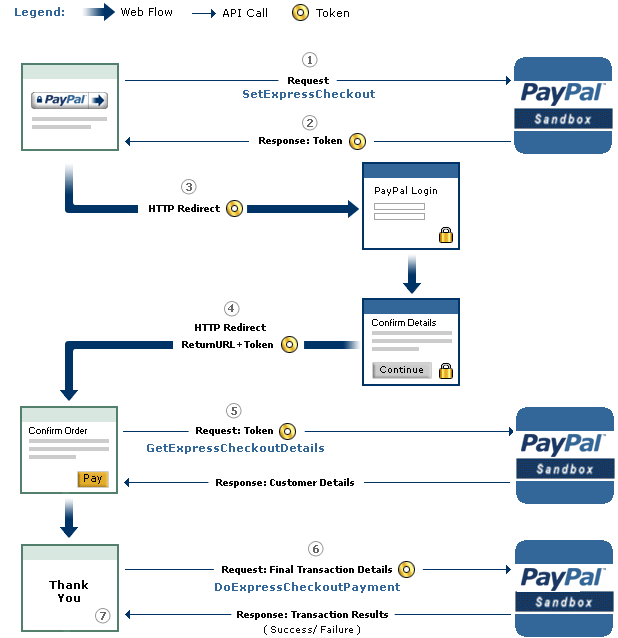
PayPal's Express Checkout [2]


Step 1: Magento tells the PayPal API where to redirect the user after authorizing the transaction via the parameter RETURNURL and requests a token for this transaction.
Step 2: The PayPal API provides Magento with the token.
Step 3: Magento redirects the user to PayPal's website. The redirect contains the token from the previous step.
Step 4:  The user authorizes the transaction. As a result, he will be redirected back to Magento (RETURNURL) with the token.
Step 5: Magento issues a request to the PayPal API to get the transaction details.

Step 6: Magento signals the PayPal API to execute the transaction.

Step 7: Magento serves the success page.

A more detailed view of the protocol and all parameters is shown on page 16 in the full version. We will concentrate only on step 6 and the parameters relevant for the attack.

The Attack

The goal of the attack is to let a shop (in our case Magento) debit more money than authorized by the PayPal user. The core of the attack is Step 6 -- DoExpressCheckoutPayment. Let's get a deeper look at this message:

Magento can raise the authorized amount and debit more money from the user's account

  • The shop sends the token, which was issued in the first step of the protocol and identifies uniquely the transaction through all steps. 
  • The PayerID referring to the user that authorized the payment.
  • The AMT defining the amount, which will be transferred.
  • The API Credentials authenticating Magento on PayPal.
  • The Version pointing to the release number of the API.

As one can imagine, the core problem we found was the change of the AMT parameter. This value can be freely chosen by the shop, despite the fact that the user has authorized a different amount.

We tested only the SandBox API, but refused to test the production API in order to avoid problems. We promptly contacted PayPal's security team and described the problem hoping that PayPal can and will test the production API against the attack.

The response of PayPal can be summarized as follows:
  • We don't get any BugBounty since we only tested the Sanbox API. (Fair enough)
  • In the Production API PayPal this flexibility is a wanted feature. Thus, PayPal allows a merchant to charge for shipping and/or other expenses different amounts. Any malicious behavior can be detected by PayPal. In case of fraudulent charges the consumer are protected by the Buyer Protection policy.
... but the Sandbox API was nevertheless fixed.

Authors of this Post

Daniel Hirschberger
Vladislav Mladenov
Christian Mainka (@CheariX)


[1] BurpSuite Logo
[2] PayPal Express Checkout

More information


APT Calypso RAT, Flying Dutchman Samples


Reference


 Attackers exploit Windows SMB vulnerability CVE-2017-0143 or use stolen credentials to gain access, deploy the custom Calypso RAT and use it to upload other tools such as Mimikatz, EternalBlue and EternalRomance. They move laterally and steal data.


Download

             Other malware


Hashes


MD5SHA256SHA1FilenameFile TyeeStage
aa1cf5791a60d56f7ae6da9bb1e7f01ed5afa3bfd423ba060207ad025467feaa56ac53d13616ac8782a7f63c9fc0fdb4bdd8b9115d1ae536d0ea1e62052485e5ad10761fMPSSVC.dllpe dllCalypso RAT Payload
1e765fed294a7ad082169819c95d2c85f6a09372156a8aef96576627a1ed9e57f194b008bb77e32ca29ac89505f933f060dda7ccd9ae00701046923b619a1b9c33c8e2acWscntfy.exepe exeCalypso RAT Dropper
17e05041730dcd0732e5b296db16d757b6c21c26aef75ad709f6c9cfa84bfa15b7ee709588382ce4bc3544a04bceb661f3301405d8ad5b160747241d6b2a8d88bf6292e8pe exeCalypso RAT Dropper
1ed72c14c4aab3b66e830e16ef90b37beebff21def49af4e85c26523af2ad659125a07a09db50ac06bd3746483c89f9ddc0d0a34f107d140d9e47582e17a7fec945403eacoal.exepe exeCalypso RAT Dropper
e24a62d9826869bc4817366800a8805cc407c3dde18c9b56ed24492ca257d77a570616074356b8c7854a080823f7ee1753791c9e7c41931a6becb999fee4eb7daf9b1a11data01.binpe dllCalypso RAT Dropper
c9c39045fa14e94618dd631044053824ab39301d45045172ad41c9a89210fdc6f0d3f9dccb567fd733b0dbffbfcfbcc31cda28bc307c09508dbb1f3495a967bbcc29326epe exeCalypso RAT Dropper
69322703b8ef9d490a20033684c28493e6a3b43acdaa824f3280095b10798ea341839f7d43f0460df8989f13c98fa6e0f203680d97705d99f92fe9797691be6177f5fd41RasCon.dllpe dllCalypso RAT Dropper
85ce60b365edf4beebbdd85cc971e84d5dfdee5dd680948d19ab4d16df534cf10aca5fa0b157c59659d6517fe897c62fd9c14f7b6de8e26ae33e41a72ae8e35bb1af4434pe exeCalypso RAT Dropper
6347e42f49a86aff2dea7c8bf455a52a281583aca23f8fd8745dd88a600cbfc578d819859a13957ec022b86c3c1c99f48b2a81af85590e0e36efc1c05aa4f0600ea21545HIDMgr.dllpe dllCalypso RAT Dropper
cb914fc73c67b325f948dd1bf97f57330031c7b63c1e1cd36d55f585d97e2b21a13a19858d5a1aa5455e5cc64b41e6e937ce4d0a3168e3b2f80b3fae38082e68a454aee0pe exeCalypso RAT Dropper
c84df4b2cd0d3e7729210f15112da7ac4e8351ddaff18f7df6fcc27a3c75598e0c56d3b406818d45effb4e78616092c241a0c5a1aad36f405c8755613c732591e3300f97mscorsvw.dllpe dllCalypso RAT Dropper
5199ef9d086c97732d97eddef56591ec511683c8ee62478c2b45be1f782ce678bbe03c4349a1778651414803010b3ee9d19a786adc09dff84642f2c2e0386193fa2a914bdnscache.dllpe dllFlyingDutchman
06c1d7bf234ce99bb14639c194b3b318a9a82099aa812d0c4025bee2b34f3b34c1d102773e36f1d50648815913dbe03d464ab9e11d371bf24de46c98c295d4afe7e957c1fromResource.exepedllFlyingDutchman
617d588eccd942f243ffa8cb13679d9c0664b09a86ec2df7dfe01a93e184a1fa23df66ea82cab39000944e418ec1f7b21b043fdcb582ed13cbf7dabcef6527762b5be93cpe dllHussar
2807236c2d905a0675878e530ed8b1f8314e438198f8cc2ee393c75f8e9f2ebd2b5133fd6f2b7deb1178f82782fc63302f6fe857632a67e87f4f3631bfa93713ccdf168aAeLookupMgr.dllpe dllCalypso RAT Payload
cce8c8ee42feaed68e9623185c3f7fe438cc404437b936660066b71cc87a28af1995248d6d4c471706eb1dd347129b4b9d2235c911b86bb6ad55d953a2f56ea78c5478e5AppCert.dll.crtCalypso RAT Payload
e1a578a069b1910a25c95e2d9450c710413622ded5d344a5a78de4fea22cfdabdeb4cdccf69e9a1f58f668096c32473836087a5b0809dc3f9dc5a77355a88e99af491a88RasCfgMan.dll.crtCalypso RAT Payload
0d532484193b8b098d7eb14319cefcd3f8043d6bfc3e63d8561f7f74e65cb7ff1731577ecf6c7559795d9de21298f0fc31f4c6dc6ce78b4e0439b30c830dfd5d9a3fc4feRasCfgMan.dllpe dllCalypso RAT Payload
974298eb7e2adfa019cae4d1a927ab070461710e681fd6dc9f1c83b57f94a88cd6df9e6432174cbfdd70dfd24577a0f841bc37679ce3caeecc176d10b4f8259918e25807VirtualUMP.dll.crtCalypso RAT Payload
05f472a9d926f4c8a0a372e1a71939988017923cd8169bf951106f053408b425f1eb310a9421685638ead55bb3823db38d909bd3450ebe0cffd0cb17b91bc28d23ef5083EFSProvider.dll.crtCalypso RAT Payload
d1a1166bec950c75b65fdc7361dcdc63f3f38c097b0cc5337b7d2dbec098bf6d0a3bb4a3e0336e7b1c8af75268a0a49d5731350f68a74fb4762c4ea878ecff635588a825RasCon.dllpe dll 64bits assemblyCalypso RAT Payload
e3e61f30f8a39cd7aa25149d0f8af5efc4dc7519bccc24c53794bf9178e4a4d0823875c34479d01cedbb3e9b10f5c7301b75ea494c3ac171c5177bdcc263b89a3f24f207MPSSVC.dllpe dllCalypso RAT Payload
Read more

Pointers Part 1: The Basics


So you're eager to learn about pointers but unfortunately you got stuck because they seemed to you terrible in nature? That's not true I know, but many of the people get confused when they arrive at the topic of pointers. Well pointers are the most important tools in C programming and are the one that can make you fly (unless you don't know how to ride over them). In this article we're going to learn basics of pointers.
Pointers are the varaibles that store addresses of other variables. Easy ain't it?
So lets start with the decleration of a pointer, pointer is decreleared as:
data_type *var_name;
e,g
int *pt;
well the astrisk(*) before the variable name is the thing that makes variable a pointer. So far so good now what?
Now lets say we want to store address of a variable in our pointer variable that seems pretty complex..!
Let's do it:
int number = 100;
int *pt = &num;
Is it really complex..?
what we are doing here is that we are first declaring and initializing a integer variable (number) with value of 100 and then we declare and initialize a pointer variable (pt) with the address of number variable. Now pt (pointer variable) contains the address of number (integer varaible). So what? Now we can use this pointer variable to change the value of number variable. Is this some kind of Magic? Maybe. Lets' do it:
*pt = 200;
what we have done here is that we De-referencing the pt variable with the asterisk (*) and then assigned it the value of 200 now the number variable contains 200. Isn't it a magic? De-referencing is used for accessing the value of the variable towards which our pointer is pointing simple. So lets write a full program of what we have learned so far.
/*Pointer Basics: Creating and Using Pointers*/
#include<stdio.h>
int main(void){
  int number = 100;
  int *pt = &number;
  printf("Value of 'number' is: %d", number);
  printf("Address of 'number' is: %p", pt);
  *pt = 200;
  printf("New value of 'number' is: %d", number);
  return 0;
}
What this whole program did was it created a integer variable and a pointer to integer variable and then printed out the value and address of the 'number' variable and after that we De-referenced the pointer variable so that we can access the value to which our pointer variable is pointing and changed the old 100 value with new 200 value and at last we printed that out. Easy isn't it?
But do you know that you can get the address of a variable even by using ampersand (&) operator? Lemme show you how. I'll declare and initialize a variable 'var' and then print it to screen using ampersand (&) operator:
int var = 10;
printf("Address of 'var' is %p\n", &var);
the last statement here will print out the address of 'var' not value so that means it is equal to this statement:
int *pt = &var;
printf("Address of 'var' is %p\n", pt);
here we first assigned the address of 'var' to pointer variable 'pt' and then printed out the address of 'var' using the pointer variable (pt).
So lets write another program that will wrap up this part of 'Pointer Basics':
/*Pointer Basics Part 1: Program 2*/
#include<stdio.h>
int main(void){
   int var = 10;
   int *pt = &var;
   printf("The Value of 'var' is: %d\n", var);
   printf("De-referencing: *pt = %d\n", *pt);
   printf("Ampersand: The Address of 'var' is %p\n",  &var);
   printf("pt = %p\n", pt);
   return 0;
}
So that's the end of first part watch out for the next part in which we'll tighten our grip on pointers and get ready for some Advanced '*po(inter)-fo'.
More info

Sherlock Tool | Find Usernames Across Social Networks

More information


Friday, May 22, 2020

BurpSuite Introduction & Installation


What is BurpSuite?
Burp Suite is a Java based Web Penetration Testing framework. It has become an industry standard suite of tools used by information security professionals. Burp Suite helps you identify vulnerabilities and verify attack vectors that are affecting web applications. Because of its popularity and breadth as well as depth of features, we have created this useful page as a collection of Burp Suite knowledge and information.

In its simplest form, Burp Suite can be classified as an Interception Proxy. While browsing their target application, a penetration tester can configure their internet browser to route traffic through the Burp Suite proxy server. Burp Suite then acts as a (sort of) Man In The Middle by capturing and analyzing each request to and from the target web application so that they can be analyzed.


Everyone has their favorite security tools, but when it comes to mobile and web applications I've always found myself looking BurpSuite . It always seems to have everything I need and for folks just getting started with web application testing it can be a challenge putting all of the pieces together. I'm just going to go through the installation to paint a good picture of how to get it up quickly.

BurpSuite is freely available with everything you need to get started and when you're ready to cut the leash, the professional version has some handy tools that can make the whole process a little bit easier. I'll also go through how to install FoxyProxy which makes it much easier to change your proxy setup, but we'll get into that a little later.

Requirements and assumptions:

Mozilla Firefox 3.1 or Later Knowledge of Firefox Add-ons and installation The Java Runtime Environment installed

Download BurpSuite from http://portswigger.net/burp/download.htmland make a note of where you save it.

on for Firefox from   https://addons.mozilla.org/en-US/firefox/addon/foxyproxy-standard/


If this is your first time running the JAR file, it may take a minute or two to load, so be patient and wait.


Video for setup and installation.


You need to install compatible version of java , So that you can run BurpSuite.
More info
  1. Rom Hacking
  2. Cracker Informatico
  3. Funnel Hacking Live
  4. Growth Hacking Pdf
  5. Growth Hacking Barcelona
  6. Hacking Background
  7. Hacking Wifi
  8. Growth Hacking Barcelona
  9. Hacking Microsoft
  10. Best Hacking Books
  11. Kali Hacking
  12. Hacking Simulator
  13. Programa De Hacking
  14. Wargames Hacking

Why Receipt Notifications Increase Security In Signal

This blog post is aimed to express and explain my surprise about Signal being more secure than I thought (due to receipt acknowledgments). I hope you find it interesting, too.

Signal, and especially its state update protocol, the Double Ratchet algorithm, are widely known for significantly increasing security for instant messaging. While most users first see the end-to-end security induced by employing Signal in messaging apps, the properties achieved due to ratcheting go far beyond protecting communication against (active) attackers on the wire. Due to updating the local device secrets via the Double Ratchet algorithm, the protocol ensures that attackers, who temporarily obtain a device's local storage (on which Signal runs), only compromise confidentiality of parts of the communications with this device. Thus, the leakage of local secrets from a device only affects security of a short frame of communication. The exact duration of compromise depends on the messaging pattern among the communicating parties (i.e., who sends and receives when), as the state update is conducted during the sending and receiving of payload messages.


The Double Ratchet

The Double Ratchet algorithm consists of two different update mechanisms: the symmetric ratchet and the asymmetric ratchet. The former updates symmetric key material by hashing and then overwriting it with the hash output (i.e.,  k:=H(k)). Thus, an attacker, obtaining key material can only predict future versions of the state but, due to the one-wayness of the hash function, cannot recover past states. The asymmetric ratchet consists of Diffie-Hellman key exchanges (DHKE). If, during the communication, party A receives a new DH share gb as part of a message from the communication partner B, then A samples a new DH exponent a and responds with the respective DH share ga in the next sent message. On receipt of this DH share, B will again sample a new DH exponent b' and attach the DH share gb' to the next message to A. With every new DH share, a new DHKE gab is computed among A and B and mixed into the key material (i.e., k:=H(k,gab)). For clarity, I leave out a lot of details and accuracy. As new DH shares ga and gb are generated from randomly sampled DH exponents a and b, and the computation of gab is hard if neither a nor b are known, the key material recovers from an exposure of the local secrets to an attacker after a new value gab was freshly established and mixed into it. Summing up this mechanism, if an attacker obtains the local state of a Signal client, then this attacker cannot recover any previously received message (if the message itself was not contained in the local state), nor can it read messages that are sent after a new gab was established and mixed into the state. The latter case happens with every full round-trip among A and B (i.e., A receives from B, A sends to B, and A receives again from B).
Conceptual depiction of Double Ratchet in Signal two years ago (acknowledgments were only protected between client and server). The asymmetric ratchet fully updates the local secrets after one round-trip of payload messages.

Research on Ratcheting

During the last two years, the Signal protocol inspired the academic research community: First, a formal security proof of Signal was conducted [1] and then ratcheting was formalized as a generic primitive (independent of Signal) [2,3,4]. This formalization includes security definitions that are derived via 1. defining an attacker, 2. requiring security unless it is obvious that security cannot be reached. Protocols, meeting this optimal notion of security, were less performant than the Double Ratchet algorithm [3,4]. However, it became evident that the Double Ratchet algorithm is not as secure as it could be (e.g., recovery from exposure could be achieved quicker than after a full round-trip; see, e.g., Appendix G of our paper [3]). Afterwards, protocols (for slightly weakened security notions) were proposed that are similarly performant as Signal but also a bit more secure [5,6,7].

Protecting Acknowledgments ...

In our analysis of instant messaging group chats [8] two years ago (blog posts: [9,10]), we found out that none of the group chat protocols (Signal, WhatsApp, Threema) actually achieves real recovery from an exposure (thus the asymmetric ratchet is not really effective in groups; a good motivation for the MLS project) and that receipt acknowledgments were not integrity protected in Signal nor WhatsApp. The latter issue allowed an attacker to drop payload messages in transmission and forge receipt acknowledgments to the sender such that the sender falsely thinks the message was received. Signal quickly reacted on our report by treating acknowledgments as normal payload messages: they are now authenticated(-encrypted) using the Double Ratchet algorithm.

... Supports Asymmetric Ratchet

Two years after our analysis, I recently looked into the Signal code again. For a training on ratcheting I wanted to create an exercise for which the lines in the code should be found that execute the symmetric and the asymmetric ratchet respectively. Somehow I observed that the pure symmetric ratchet (only updates via hash functions) was nearly never executed (especially not when I expected it) when lively debugging the app but almost always new DH shares were sent or received. I realized that, due to encrypting the receipt acknowledgments now, the app always conducts full round-trips with every payload message. In order to observe the symmetric ratchet, I needed to temporarily turn on the flight mode on my phone such that acknowledgments are not immediately returned.
Conceptual depiction of Double Ratchet in Signal now (acknowledgments encrypted). The asymmetric ratchet fully updates the local secrets after an acknowledgment for a message is received.

Consequently, Signal conducts a full DHKE on every sent payload message (in case the receiving device is not offline) and mixes the result into the state. However, a new DH exponent is always already sampled on the previous receipt (see sketch of protocol above). Thus, the exponent for computing a DHKE maybe remained in the local device state for a while. In order to fully update the state's key material, two round-trips must be initiated by sending two payload messages and receiving the resulting two acknowledgments. Please note that not only the mandatory receipt acknowledgments are encrypted but also notifications on typing and reading a message.

If you didn't understand exactly what that means, here a tl;dr: If an attacker obtains your local device state, then with Signal all previous messages stay secure and (if the attacker does not immediately use these secrets to actively manipulate future conversations) all future messages are secure after you wrote two messages (and received receipt acknowledgments) in all of your conversations. Even though this is very (in practice certainly sufficiently) secure, recent protocols provide stronger security (as mentioned above) and it remains an interesting research goal to increase their performance.

[1] https://eprint.iacr.org/2016/1013.pdf
[2] https://eprint.iacr.org/2016/1028.pdf
[3] https://eprint.iacr.org/2018/296.pdf
[4] https://eprint.iacr.org/2018/553.pdf
[5] https://eprint.iacr.org/2018/889.pdf
[6] https://eprint.iacr.org/2018/954.pdf
[7] https://eprint.iacr.org/2018/1037.pdf
[8] https://eprint.iacr.org/2017/713.pdf
[9] https://web-in-security.blogspot.com/2017/07/insecurities-of-whatsapps-signals-and.html
[10] https://web-in-security.blogspot.com/2018/01/group-instant-messaging-why-baming.html

Related posts


DSniff


"dsniff is a collection of tools for network auditing and penetration testing. dsniff, filesnarf, mailsnarf, msgsnarf, urlsnarf, and webspy passively monitor a network for interesting data (passwords, e-mail, files, etc.). arpspoof, dnsspoof, and macof facilitate the interception of network traffic normally unavailable to an attacker (e.g, due to layer-2 switching). sshmitm and webmitm implement active monkey-in-the-middle attacks against redirected SSH and HTTPS sessions by exploiting weak bindings in ad-hoc PKI." read more...

Website: http://www.monkey.org/~dugsong/dsniff/

Related news